TOP › My Page TOP ›
Submission Workflow › Technical Guides / Submission Tips › Vket 2026 Winter ›
Reference values of world lighting
Reference values of world lighting
Please ignore these values if you don't know what they are. These are for exhibitors who want to manage the look of their spaces with more precision.
VRChat, the venue of Vket, uses Unity engine for 3D rendering. In 3D rendering, the "light" settings of color, intensity, and others will change the look of everything.
In reality, for example, brighter light makes everything in the room look brighter, that is whiter, and lights with blue color make the room look blueish.
These settings of lights and environment are called "lighting". Since the setting is held on the world side, the same object may look different at the world with different lighting settings. Vket has roughly the following setting values.
These are mere reference values that may be adjusted by the organizer in accordance with submitted data.
In this summary, we cover important settings like Environment, Directional Light, and PostProcessVolume. Yet, especially for dimly lit worlds, there may be other kinds of lights set.
Please visit the Preview World via the Mypage to check the lighting condition and how your space will look in the actual world.
Furthermore, to display the spaces in an attractive way, we may put lights other than Directional Light or set up areas not affected by the Directional Light.
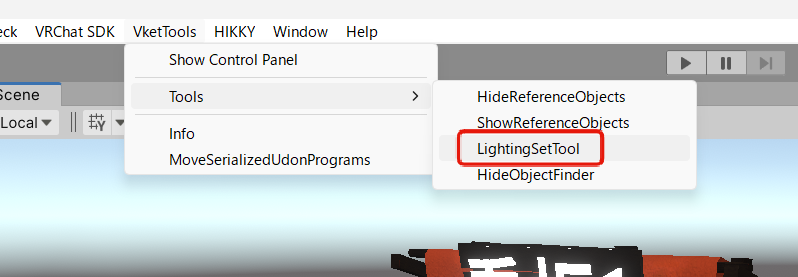
Directional Lights and other lighting objects are hidden in the submission scene by default. You can configure them via the VketTools > Tools > LightingSetTool window from the Unity Editor menu.
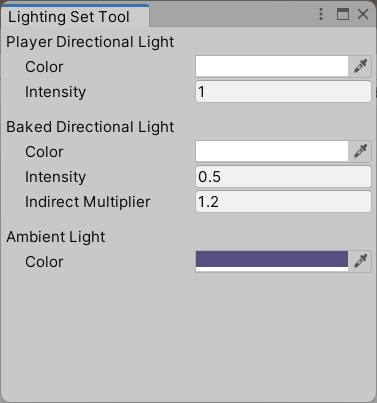
Also, please refer to the Lighting Guide for Exhibitors for details on the roles of each light.
Environment Lighting: Environment lighting settings. In Vket 2026 Winter, environment lighting is configured using the Ambient Directional Light.
Player Directional Light: Realtime Directional Light with NoShadow that will affect the default layer and the players.
Baked Directional Light: A baked Directional Light with Soft Shadows used for light baking.
Ambient Directional Light: A baked, NoShadow Directional Light that acts as ambient light. In Vket 2026 Winter, this light is used to calculate ambient lighting.
PostProcessingVolume: Setting value of PostProcessingVolume applied to the world globally. This value won't be reflected on Android builds.
Lightmap Settings: Settings for baking the lights in the world, that is generating the lightmaps.
| SHINOBI | KUNOICHI |
|---|
| Environment Lighting | | |
| Source | Color | Color |
| Ambient Color | 0, 0, 0 | 0, 0, 0 |
| Player Directional Light | | |
| Color | 70, 70, 70 | 70, 70, 70 |
| Intensity | 1.0 | 1.0 |
| Baked Directional Light | | |
| Color | 70, 70, 70 | 70, 70, 70 |
| Intensity | 0.5 | 0.5 |
| Indirect Multiplier | 1.2 | 1.2 |
| Ambient Directional Light | | |
| Color | 70, 70, 70 | 70, 70, 70 |
| PostProcessingVolume | | |
| Bloom.Intensity | 1.0 | 1.0 |
| Bloom.Threshold | 1.2 | 1.2 |
| Bloom.Clamp | 2.0 | 2.0 |
| Lightmap Settings | | |
| Directional Mode | Directional | Directional |
| Sky Bouquet | Sea Bloom |
|---|
| Environment Lighting | | |
| Source | Color | Color |
| Ambient Color | 0, 0, 0 | 0, 0, 0 |
| Player Directional Light | | |
| Color | 255, 255, 255 | 255, 255, 255 |
| Intensity | 0.9 | 0.9 |
| Baked Directional Light | | |
| Color | 255, 255, 255 | 255, 255, 255 |
| Intensity | 0.63 | 0.63 |
| Indirect Multiplier | 1.2 | 1.2 |
| Ambient Directional Light | | |
| Color | 80, 80, 80 | 80, 80, 80 |
| PostProcessingVolume | | |
| Bloom.Intensity | 1.0 | 1.0 |
| Bloom.Threshold | 1.2 | 1.2 |
| Bloom.Clamp | 2.0 | 2.0 |
| Lightmap Settings | | |
| Directional Mode | Directional | Directional |
| Mythos | Logos | Pathos |
|---|
| Environment Lighting | | | |
| Source | Color | Color | Color |
| Ambient Color | 0, 0, 0 | 0, 0, 0 | 0, 0, 0 |
| Player Directional Light | | | |
| Color | 70, 70, 70 | 70, 70, 70 | 70, 70, 70 |
| Intensity | 1.0 | 1.0 | 1.0 |
| Baked Directional Light | | | |
| Color | 192, 192, 192 | 192, 192, 192 | 192, 192, 192 |
| Intensity | 1.0 | 1.0 | 1.0 |
| Indirect Multiplier | 1.0 | 1.0 | 1.0 |
| Ambient Directional Light | | | |
| Color | 160, 160, 160 | 160, 160, 160 | 160, 160, 160 |
| PostProcessingVolume | | | |
| Bloom.Intensity | 1.0 | 1.0 | 1.0 |
| Bloom.Threshold | 1.2 | 1.2 | 1.2 |
| Bloom.Clamp | 2.0 | 2.0 | 2.0 |
| Lightmap Settings | | | |
| Directional Mode | Directional | Directional | Directional |
| Sunnyside Hut | Sunset Mountain | Afterdark Plaza |
|---|
| Environment Lighting | | | |
| Source | Color | Color | Color |
| Ambient Color | 0, 0, 0 | 0, 0, 0 | 0, 0, 0 |
| Player Directional Light | | | |
| Color | 255, 255, 255 | 255, 255, 255 | 188, 188, 188 |
| Intensity | 1.0 | 0.7 | 1.0 |
| Baked Directional Light | | | |
| Color | 255, 255, 255 | 255, 223, 191 | 0, 0, 0 |
| Intensity | 0.5 | 0.5 | 0 |
| Indirect Multiplier | 1.0 | 1.0 | 0 |
| Ambient Directional Light | | | |
| Color | 236, 236, 236 | 255, 223, 194 | 218, 240, 255 |
| PostProcessingVolume | | | |
| Bloom.Intensity | 1.0 | 1.0 | 1.0 |
| Bloom.Threshold | 1.2 | 1.2 | 1.2 |
| Bloom.Clamp | 2.0 | 2.0 | 2.0 |
| Lightmap Settings | | | |
| Directional Mode | Directional | Directional | Directional |
| Detective | Murderer |
|---|
| Environment Lighting | | |
| Source | Color | Color |
| Ambient Color | 0, 0, 0 | 0, 0, 0 |
| Player Directional Light | | |
| Color | 70, 70, 70 | 70, 70, 70 |
| Intensity | 1.0 | 1.0 |
| Baked Directional Light | | |
| Color | 0, 0, 0 | 0, 0, 0 |
| Intensity | 0 | 0 |
| Indirect Multiplier | 0 | 0 |
| Ambient Directional Light | | |
| Color | 0, 0, 0 | 0, 0, 0 |
| PostProcessingVolume | | |
| Bloom.Intensity | 1.0 | 1.0 |
| Bloom.Threshold | 1.2 | 1.2 |
| Bloom.Clamp | 2.0 | 2.0 |
| Lightmap Settings | | |
| Directional Mode | Directional | Directional |
| Neon | Void |
|---|
| Environment Lighting | | |
| Source | Color | Color |
| Ambient Color | 0, 0, 0 | 0, 0, 0 |
| Player Directional Light | | |
| Color | 255, 255, 255 | 255, 255, 255 |
| Intensity | 1.0 | 1.0 |
| Baked Directional Light | | |
| Color | 255, 255, 255 | 255, 255, 255 |
| Intensity | 1.0 | 1.0 |
| Indirect Multiplier | 1.0 | 1.0 |
| Ambient Directional Light | | |
| Color | 43, 52, 89 | 76, 45, 54 |
| PostProcessingVolume | | |
| Bloom.Intensity | 1.0 | 1.0 |
| Bloom.Threshold | 1.2 | 1.2 |
| Bloom.Clamp | 2.0 | 2.0 |
| Lightmap Settings | | |
| Directional Mode | Directional | Directional |
| Mystery Catalogue | Enigma Records |
|---|
| Environment Lighting | | |
| Source | Color | Color |
| Ambient Color | 0, 0, 0 | 0, 0, 0 |
| Player Directional Light | | |
| Color | 103, 103, 103 | 103, 103, 103 |
| Intensity | 1.0 | 1.0 |
| Baked Directional Light | | |
| Color | 41, 41, 41 | 41, 41, 41 |
| Intensity | 1.0 | 1.0 |
| Indirect Multiplier | 1.0 | 1.0 |
| Ambient Directional Light | | |
| Color | 57, 54, 86 | 57, 54, 86 |
| PostProcessingVolume | | |
| Bloom.Intensity | 1.0 | 1.0 |
| Bloom.Threshold | 1.2 | 1.2 |
| Bloom.Clamp | 2.0 | 2.0 |
| Lightmap Settings | | |
| Directional Mode | Directional | Directional |
For the concepts below, Cross-Platform support differs from world to world.
Dragonclimb Festival is a PC venue world, and Aquagift Festival is a Cross-Platform venue world.
| Dragonclimb Festival | Aquagift Festival |
|---|
| Environment Lighting | | |
| Source | Color | Color |
| Ambient Color | 0, 0, 0 | 0, 0, 0 |
| Player Directional Light | | |
| Color | 255, 255, 255 | 255, 255, 255 |
| Intensity | 1.0 | 1.0 |
| Baked Directional Light | | |
| Color | 255, 255, 255 | 255, 255, 255 |
| Intensity | 0.8 | 0.8 |
| Indirect Multiplier | 1.2 | 1.2 |
| Ambient Directional Light | | |
| Color | 102, 115, 120 | 102, 115, 120 |
| PostProcessingVolume | | |
| Bloom.Intensity | 1.0 | 1.0 |
| Bloom.Threshold | 1.2 | 1.2 |
| Bloom.Clamp | 2.0 | 2.0 |
| Lightmap Settings | | |
| Directional Mode | Directional | Non-Directional |
Sefirot is a PC venue world, and Qliphoth is a Cross-Platform venue world.
| Sefirot | Qliphoth |
|---|
| Environment Lighting | | |
| Source | Color | Color |
| Ambient Color | 0, 0, 0 | 0, 0, 0 |
| Player Directional Light | | |
| Color | 255, 255, 255 | 255, 255, 255 |
| Intensity | 1.0 | 1.0 |
| Baked Directional Light | | |
| Color | 255, 255, 255 | 255, 255, 255 |
| Intensity | 0.5 | 0.5 |
| Indirect Multiplier | 0.5 | 0.5 |
| Ambient Directional Light | | |
| Color | 127, 125, 149 | 127, 125, 149 |
| PostProcessingVolume | | |
| Bloom.Intensity | 1.0 | 1.0 |
| Bloom.Threshold | 1.2 | 1.2 |
| Bloom.Clamp | 2.0 | 2.0 |
| Lightmap Settings | | |
| Directional Mode | Directional | Non-Directional |
↑ Back to Top