TOP › My Page TOP ›
Submission Workflow › Technical Guides / Submission Tips ›
How to Copy Objects From Scene to Scene
How to Copy Objects From Scene to Scene
When creating Vket exhibits, you may want to copy objects between scenes.
e.g. Copy the whole exhibit from the editing Scene to the Scene for submission.
In this page, we explain how to copy Objects between Scenes using Multi-Scene editing.
Please utilize this when moving exhibits you created beforehand into the submission Scene created after the Submission Period begins.
The steps shown below are not unique to VketTools and can be applied to more general things, like avatars or world setups.
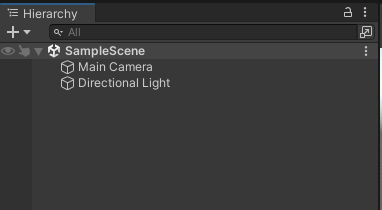
As you normally would, open the Scene where you want your Object to be placed. The hierarchy will be like this:
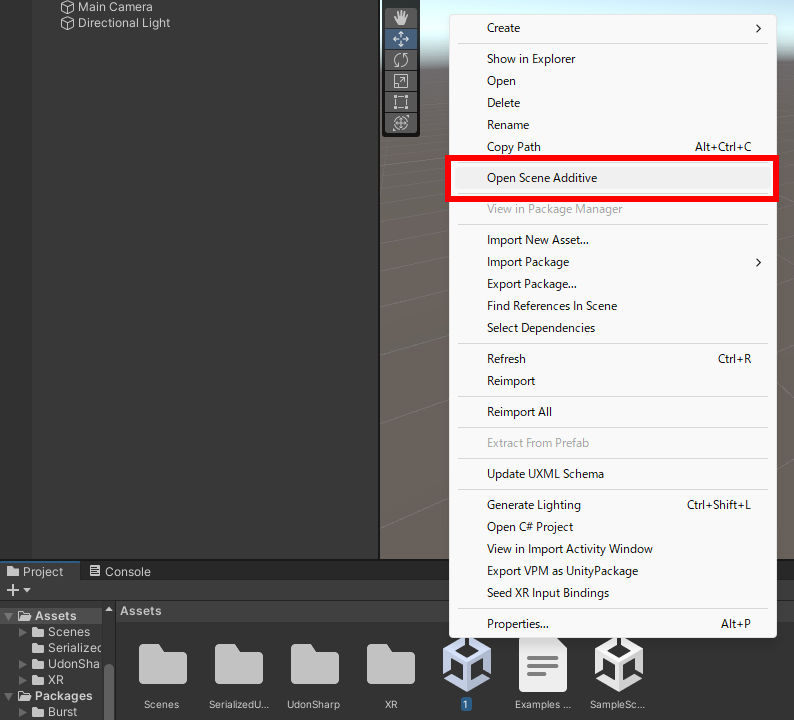
Next, Right-click the original Scene and select "Open Scene Additive".
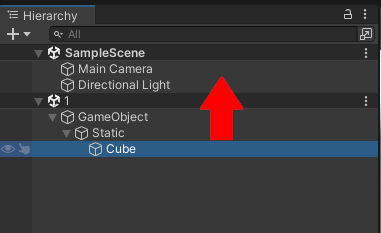
Then, in the Hierarchy window, both the original and the destination Scenes will appear to be open at the same time.
Since the two Scenes are opened at the same time, Objects can be drag and dropped.
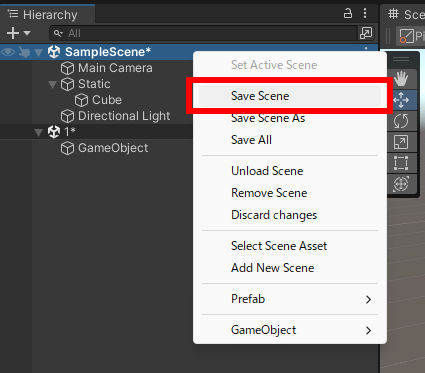
By Right-clicking the Scene and selecting "Save Scene", only the selected Scene will be saved. Save the Scene that you have moved your Objects to. That’s all.
Saving the original Scene will make the Object transferred, not copied (since the objects moved in the procedures above have been removed from the original Scene).
Reopening the Scene will reset the Hierarchy window, and you can continue with your editing.
Check the Official Guidelines
Before submitting, please make sure to review the Exhibition Guidelines and Submission Rules. For the submission steps, see the Submission Guide.
↑ Back to Top