TOP › My Page TOP ›
Submission Workflow › Vket Official Assets ›
VketFollowPickup
VketFollowPickup
In addition to VketPickup, this Pickup allows you to equip the object on the head or other parts.
The position will be synchronized globally, and will return to the initial position if idle for 30 seconds.
Example of usage: Equip a hat on the head. The hat will follow the head even after letting the hands go.
You may specify the Bone to be followed upon submission. When the player Use the object near the set Bone (like pressing a button. Exact control depends on controllers.), the object will start to follow the player.
Select the Prefab's "Generate and Configure Prefab" button in the VketTools' VketPrefab list.
Follow the instructions in VketTools to setup the Prefab.
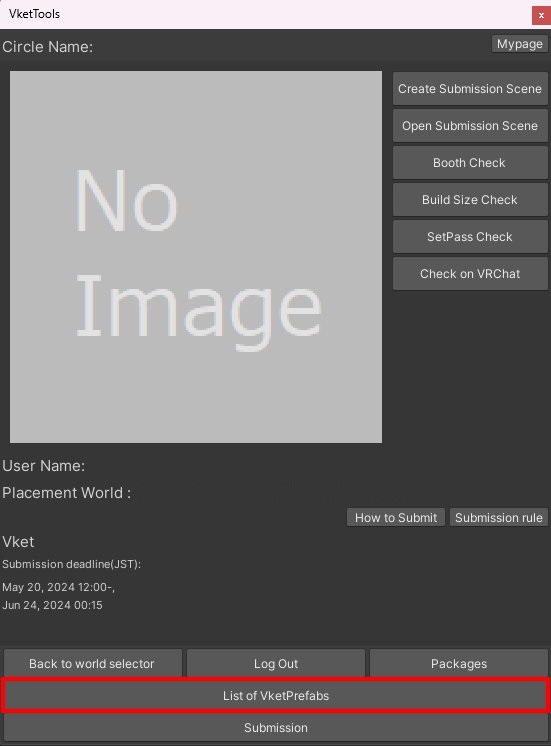
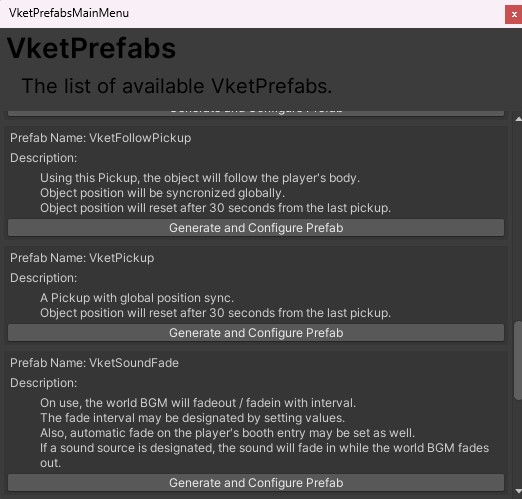
After adding a new Prefab to the scene, the setup window will be displayed.
If the window's closed without edits, you may select the added VketFollowPickup object in the Hierarchy, and edit the settings through the Open Setting Window button on the Inspector.
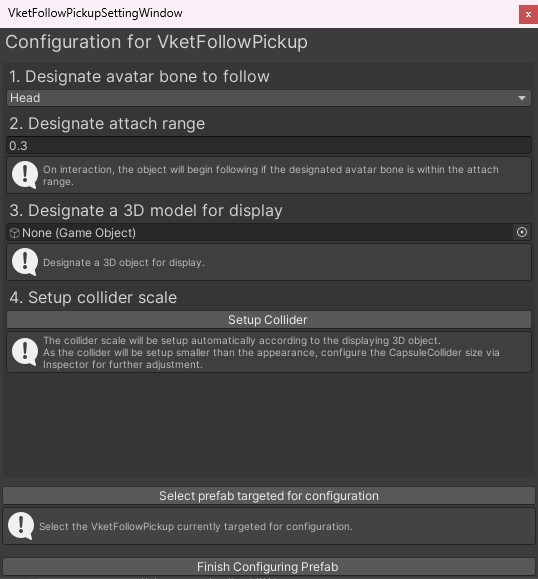
- Designate avatar bone to follow
Set the Target Bone for the object to follow on object interaction.
The selectable bones are as follows:
- Head
- Neck
- Chest
- Spine
- Hips
- Shoulder
- UpperArm
- LowerArm
- Hand
- UpperLeg
- LowerLeg
- Foot
- Designate attach range
On interaction, the object will begin following the player's avatar bone if the designated avatar bone is within this attach range.
The default value is 0.3 meter radius.
- Designate a 3D model for display
Place an object to be picked up under the VketFollowPickup object.
Then, allocate the designated child object in the configuration.
- Setup collider scale
By selecting Setup Collider, a Capsule Collider will be automatically set according to the displaying 3D object.
As the collider is set to be smaller than the original object, please manually adjust the scale if the size is not enough.
If automatic setup does not work, select the VketFollowPickup prefab in the Hierarchy, and adjust the Capsule Collider in the Inspector.
↑ Back to Top