TOP › My Page TOP ›
Submission Workflow › Vket Official Assets ›
VketImageDownloader
VketImageDownloader
This Prefab is for downloading and displaying image from a URL, using VRChat’s Image Loading(vrchat.com) feature.
If the target URL domain is not whitelisted in VRChat’s Trusted URLs, the image won’t be loaded unless the booth visitor has enabled “Allow Untrusted URLs” in the VRChat settings.
The image will be loaded when the “VketOnBoothEnter” trigger fires, and overwrite on the designated Renderer’s Material MainTex. (The shader parameter of the overwriting image can be adjusted on the prefab’s TextureInfo)
Only one image can be loaded globally, should other booths load another image, the displaying Renderer will return to the original texture.
*If the designated URL is not included in VRChat'sTrustedURLs, visitors may not see the image if Allow Untrusted URLs is disabled in their settings.
*This feature is intended for experienced exhibitors. Setup the prefab's settings in the Inspector.
Select the Prefab's "Generate and Configure Prefab" button in the VketTools' VketPrefab list.
Follow the instructions in VketTools to setup the Prefab.
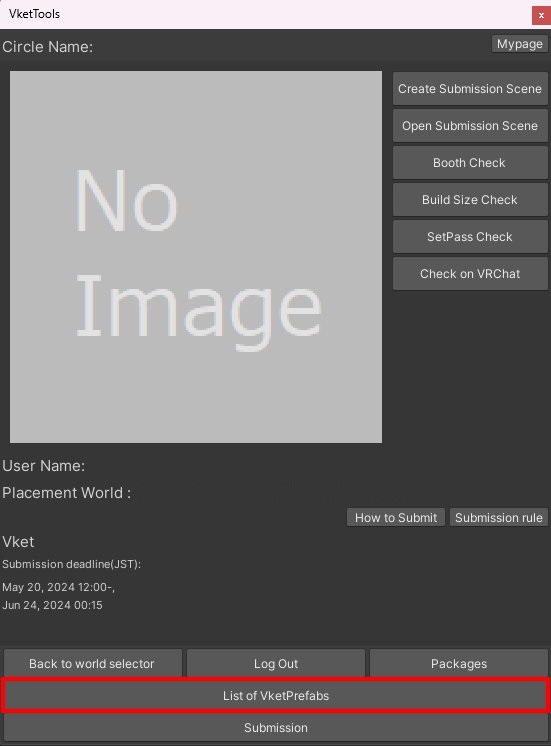
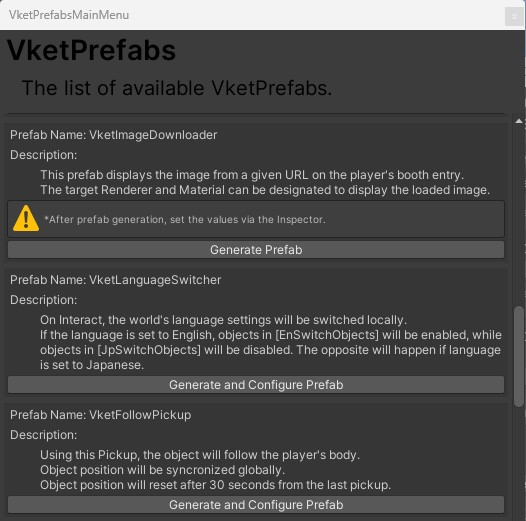
To configure the prefab, select the VketImageDownloader in the Hierarchy, and edit the prefab in the Inspector.
Designate the target to render the image in Target Renderer and Target Material.
For example, an image is displayed onto a Quad by setting as below:
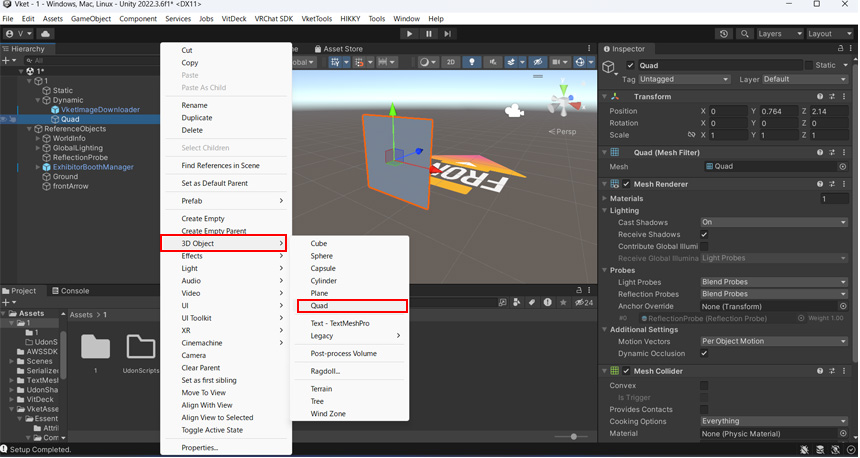
- Create a Quad
Create a Quad under the Dynamic object, by right clicking and selecting 3DObject --> Quad in the Hierarchy.
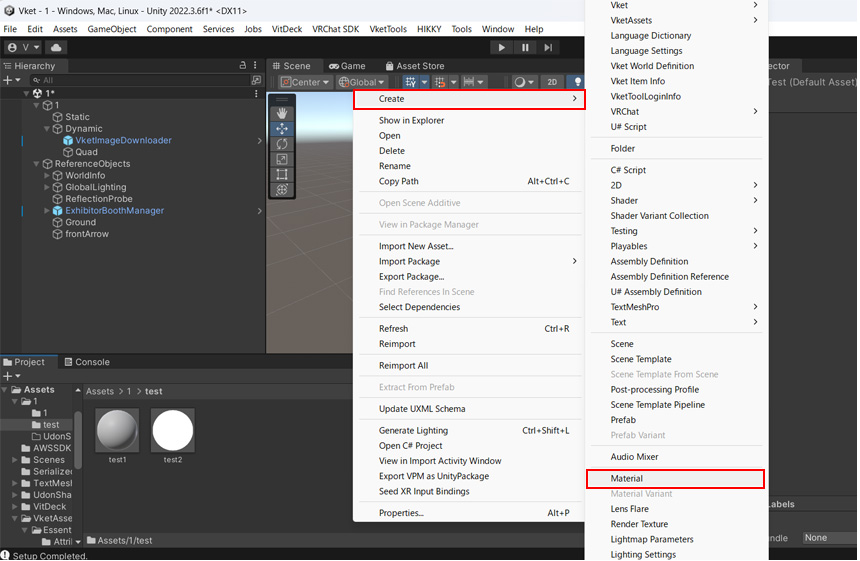
- Creating a material for the Quad
Right click in the Assets window, and select Create --> Material.
As an example, the Unlit/Texture shader is used. Shader is up to the exhibitor's choice, and can be changed on the Inspector.
- Designating the material to the Quad
Drag and drop the created material to the Quad.
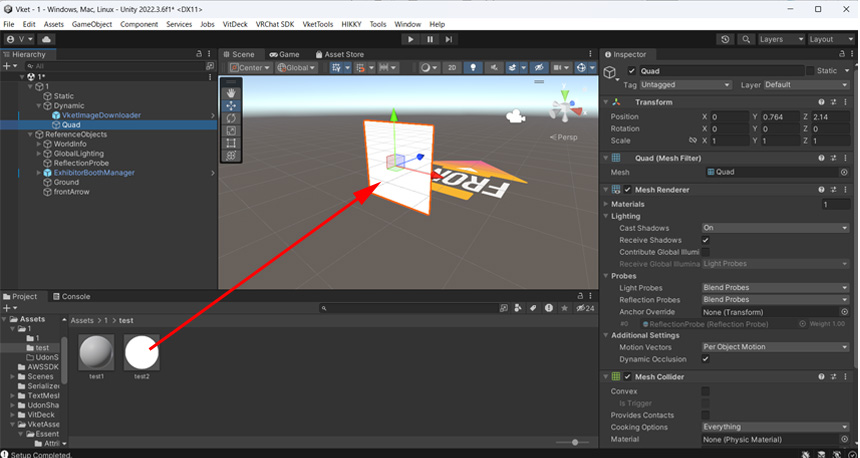
- Set the image's URL, Target Render, and Target Material
Select
VketImageDownloader in the Hierarachy, and designate the Image's URL in URL.
For Target Render, allocate a Renderer (the created Quad for this example) to display the image.
For Target Material, allocate the material created previously.
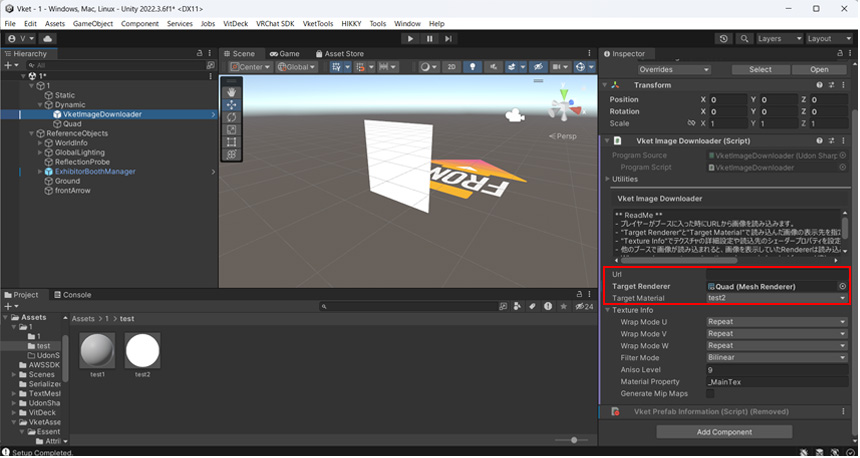
*Maximum Resolution is 2048 x 2048 pixels.
*If the URL domain is not one of the below, image will not be displayed unless “Allow Untrusted URLs” is enabled on the VRChat settings.
- Discord (cdn.discordapp.com)
- Dropbox (dl.dropbox.com)
- GitHub (*.github.io)
- ImageBam (images4.imagebam.com)
- ImgBB (i.ibb.co)
- imgbox (images2.imgbox.com)
- Imgur (i.imgur.com)
- Postimage (i.postimg.cc)
- Reddit (i.redd.it)
- X (pbs.twimg.com)
- VRCDN (*.vrcdn.cloud)
- VRChat (assets.vrchat.com)
- Ytimg (i.ytimg.com)
For details, check the VRChat official document: Image Loading(vrchat.com)
In VketImageDownloader, the Texture Info can be edited to designate advanced texture settings and shader properties.
↑ Back to Top