TOP › My Page TOP ›
Submission Workflow › Vket Official Assets ›
VketStringDownloader
VketStringDownloader
This Prefab is for downloading and displaying text from a URL, using VRChat’s String Loading(vrchat.com) feature.
The loaded text will be written to the component designated in Target Text.
Components applicable for Target Text are: Text, TextMeshPro, and TextMeshProUGUI.
*If the target URL domain is not whitelisted in VRChat’s Trusted URLs, the text won’t be loaded unless the booth visitor has enabled Allow Untrusted URLs in the VRChat settings.
*This feature is intended for experienced exhibitors. Setup the prefab's settings in the Inspector.
Select the Prefab's "Generate and Configure Prefab" button in the VketTools' VketPrefab list.
Follow the instructions in VketTools to setup the Prefab.
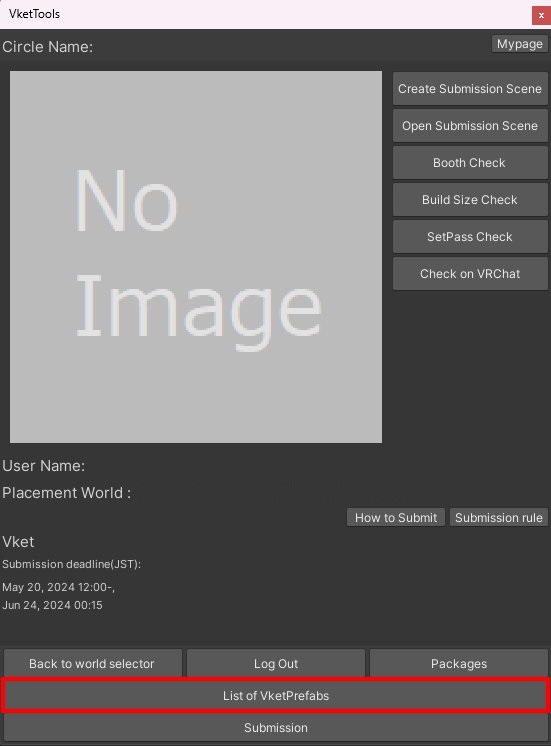
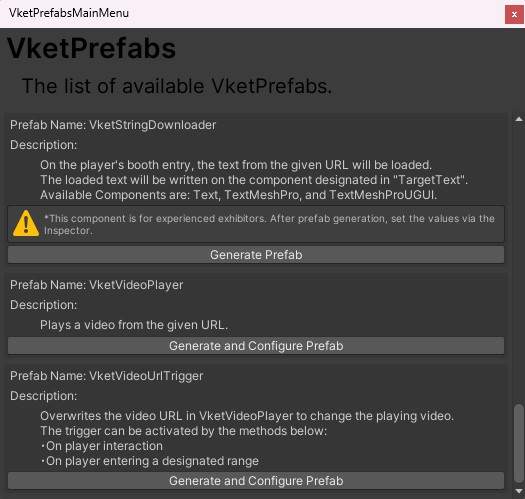
To configure the prefab, select the VketStringDownloader in the Hierarchy, and edit the prefab in the Inspector.
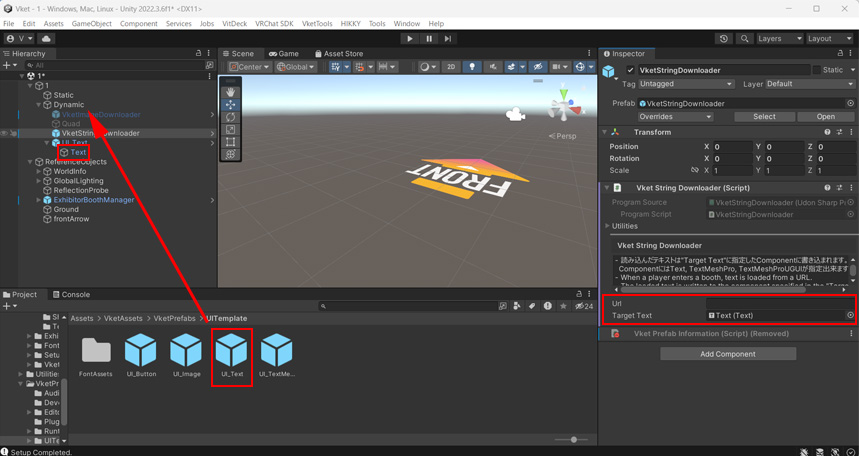
- Designate a URL
Select VketStringDownloader in the Hierarchy, and enter the URL of any external text in Url on the Inspector.
*If the URL domain is not one of the below, text will not be displayed unless “Allow Untrusted URLs” is enabled on the VRChat settings.
- DisBridge (*.disbridge.com)
- GitHub (*.github.io)
- GitHub Gist (gist.githubusercontent.com)
- Pastebin (pastebin.com)
- VRCDN (*.vrcdn.cloud)
For details, check the VRChat official document: String Loading(vrchat.com)
- Designate Target Text
Open Assets > VketAssets > VketPrefabs > UITemplate, and drag & drop the UI_Text.prefab under the Dynamic object.
Then, select the VketStringDownloader in the Hierarchy, and designate the Text object in the UI_Text prefab to the Target Text in Inspector.
↑ Back to Top