TOP › My Page TOP ›
Submission Workflow › Vket Official Assets ›
VketVideoUrlTrigger
VketVideoUrlTrigger
This prefab will change the URL of the designated VketVideoPlayer, and play the video.
The VideoPlayer will play the video on either of the following triggers:
- on player interact
- on player’s entry to the designated space
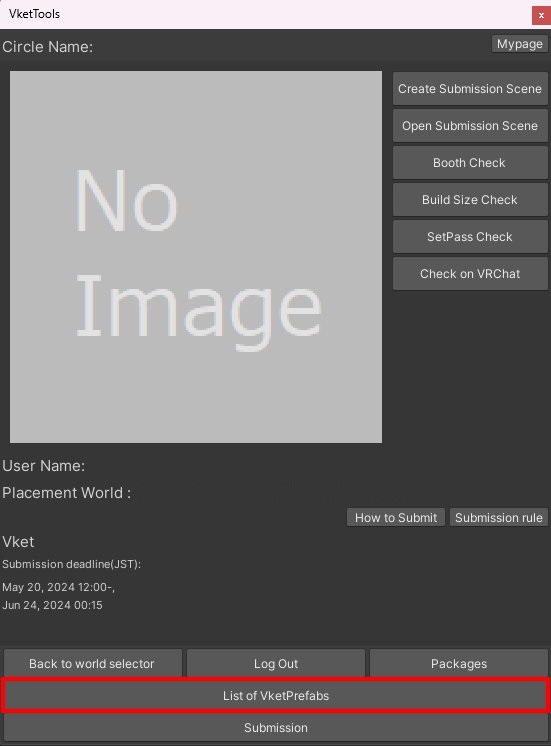
Select the Prefab's "Generate and Configure Prefab" button in the VketTools' VketPrefab list.
Follow the instructions in VketTools to setup the Prefab.
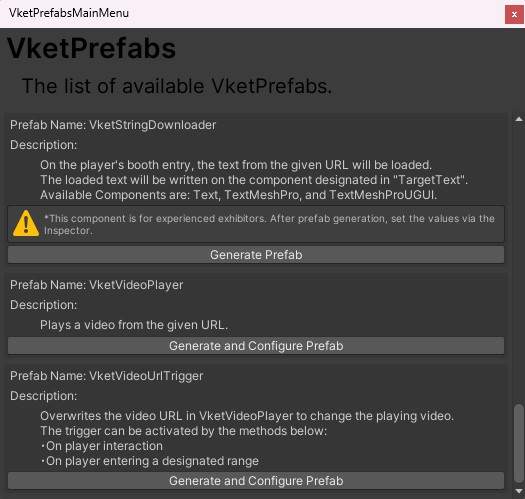
After adding a new Prefab to the scene, the setup window will be displayed.
If the window's closed without edits, you may select the added VketVideoUrlTrigger object in the Hierarchy, and edit the settings through the Open Setting Window button on the Inspector.
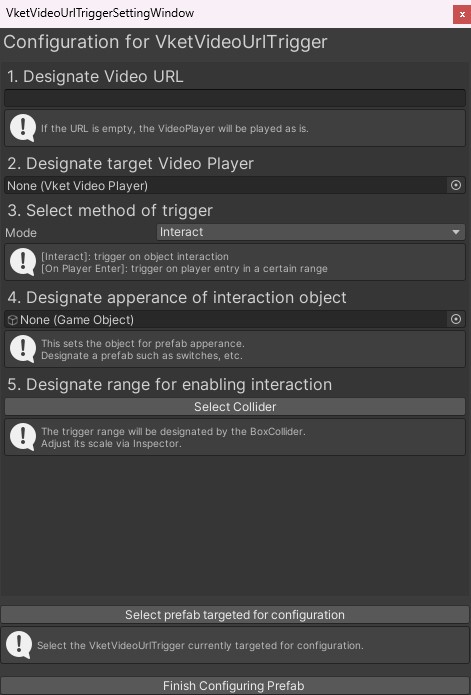
- Designate Video URL
If the URL is empty, the VideoPlayer will resume playing. - Designate target Video Player
The designated VketVideoPlayer will have its URL overwritten and play the new video. - Set method of trigger
Two modes are available for triggering:
Interact and On Player Enter.
- Interact:on player interaction
- On Player Enter:on player’s entry to the designated space
- Designate appearance of interaction object
This sets an object that will be the appearance for the switch.
Designate a prefab such as switches, etc. - Designate range for enabling interaction
On pressing the
Select Collider button, the VketVideoUrlTrigger will be selected in the Hierarchy.
The Box Collider of the prefab can have its range edited in the Inspector.
*This setting can be skipped if the method of trigger is set to On Player Enter.
To use the VketVideoUrlTrigger, a VketVideoPlayer must be allocated.
For details about the prefab, please refer to VketVideoPlayer.
↑ Back to Top