Submission Rules: Avatar Exhibition
⚠️ This page contains information as of Vket2025 Winter. Please refer to the latest event information.
This page contains the submission rules for avatar exhibitions.
Please review this information when applying for an exhibition or submitting materials.
- For submission rules regarding space exhibitions, please refer to Submission Rules: Space Exhibition.
- For submission rules regarding item exhibitions, please refer to Submission Rules: Item Exhibition.
- The contents of this page may change or be updated due to rule revisions. Please review the information again before submitting your work.
- Please note that the rules and restrictions for Avatar Exhibition at Vket2025 Winter are significantly different from those of Vket2025 Summer.
- This Avatar Exhibition focuses on the Avatar Marketplace, aiming to provide visitors with the experience of changing avatars directly in-world.
- Exhibitors are required to submit a Unity Humanoid model.
- Non-Humanoid avatars or 3D models that are not avatars cannot be exhibited.
- products that are not Cross-Platform compatible cannot be exhibited.
- When applying for an avatar exhibition, you must select the method of distribution or sales for the avatar at the time of application.
- Those who have already registered their avatar in the Avatar Marketplace will receive top priority in the lottery.
- Please check the option "Sell on Avatar Marketplace" when applying for the lottery, and then enter your Listing ID.
- The entered Listing ID will only be used for the lottery. During submission, you can register a Listing ID again, specify a different product bundle, or exhibit a different avatar.
- Applicants with pending avatar registration requests in the Avatar Marketplace will likewise be given priority during the lottery.
- When applying for the lottery, you may complete your exhibition application after checking "Sell on Avatar Marketplace" even if the Listing ID field is left blank.
- However, please make sure to enter your Listing ID by 23:59:59 on September 29 JST.
- First-round winners must enter their Listing ID on time, otherwise their entry will move to the second lottery. Please note this in advance.
- If you do not plan to register your avatar on the Avatar Marketplace, please do not check "Sell on Avatar Marketplace" when applying for the lottery.
- If you expect that you will not be able to enter your Listing ID within the designated period, we recommend applying for the lottery without checking "Sell on Avatar Marketplace."
- Changed the process so that shaders requiring VPM package installation must be registered manually in VCC.
- Cross-Platform Venue
- YOUtopia
- VketPlaza -Quest Mode-
- Avatar Exhibitions will be open on the Cross-Platform Venue.
Submission Rules for Cross-Platform venues are similar as PC, but has the following differences:
- Exhibition must be available on Cross-Platform environments
- Maximum build size is 5MB for Windows build, 3MB for Android build
- Avatars registered to pedestal must be Cross-Platform compatible
- World Specification - Light Settings: Directional Mode is set to Non-Directional
- Shaders have restrictions for Cross-Platform compatibility
- A large number of spaces will be set up at each venue. We would like to have many gorgeous spaces lined up in a lively and fun venue.
- Meanwhile, to deal with the problems inherent to large-scale worlds, we will set rules for space creation.
- To maintain a comfortable playing environment for visitors by avoiding high load on the PC
- Avoid inconsistent formats that will cause difficulties for the organizers to check and manage the data
- Avoid fatal bugs such as instance crush resulting in VRChat crash or returning to other world
- Before submission, make sure to check the compliance with the submission rules. Please use the submission tool (hereinafter referred to as VketTools) provided by the organizer.
- Please note that if the submitted space does not comply with the submission rules, the organizers may request a resubmission.
- Even if the space complies with the submission rules, if the space is deemed problematic such as taking up a high load, the organizers may request a resubmission.
- In the case of spaces with a significantly small amount of information, the exhibitor may be asked to confirm after the submission period, and the space may be removed only if the confirmation cannot be obtained.
- Cross-Platform Venue Worlds will go through two separate builds for PC and Quest. Due to texture compression issues, the submitted space may look a bit different in PC build and Quest build.
- Checking appearance on real devices are strongly recommended.
- On Android build, some gimmicks may not function or have different behavior.
- The Cross-Platform Venue Worlds are expected to be visited by many players on mobile environments. Please avoid such a situation that your main exhibit is available only on PC-platform VRChat or on SteamVR.
- On the occasion of the world’s Android build capacity exceeding 100MB and uploading becomes unavailable, the development team may readjust the submitted data’s compression settings with the consent of the exhibitor.
- In the Avatar Exhibition (Cross-Platform Venue), one avatar and an information panel will be displayed per space.
- Submitted avatar will be placed in the Preview World once during the submission period and once after the submission period ends.
- Unlike other exhibition formats, the Preview World will not be updated daily.
- Avatar Information Board
- The external link button can only direct to product pages on the following services:
- Regardless of whether the avatar is sold on the Avatar Marketplace or on an e-commerce site, products that are not Cross-Platform compatible cannot be exhibited.
- If you wish to exhibit a product on the Avatar Marketplace, please note that you must be a VRChat-certified Avatar Marketplace seller, and the Listing ID of the avatar product is required when applying.
- For more information about the Avatar Marketplace, please refer to the following URL:
https://hello.vrchat.com/avatar-marketplace
- Submitted data will be exhibited as follows:
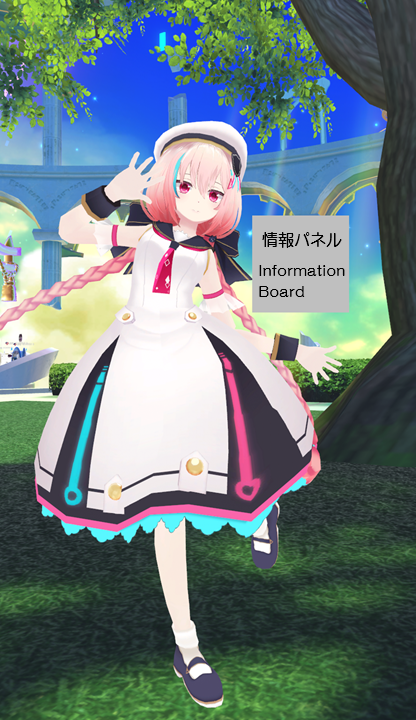
- Exhibited Avatar
- Animations corresponding to the world or location where the avatar is placed will be applied to the exhibited avatar.
- Please submit a Unity Humanoid model.
- Non-Humanoid avatars or 3D models that are not avatars cannot be exhibited.
- Avatar Information Board
- A board displaying product information and an avatar pedestal will be placed near the submitted avatar.
- Creator Name (JP/EN)
- Avatar Name (JP/EN)
- Price
- Depending on the sales method, the panel will have the following additional features:
- Avatar Marketplace
- A button to open the Avatar Marketplace product page corresponding to the registered Listing ID
- Other Services
- Avatar Pedestal (Cross-Platform support required)
- External link button to the product page on Other Services or the exhibitor's catalog page
- The settings for these features can be configured on VketTools.
Please note that work performed in environments other than the following will not be supported:
- Create space exhibition using Unity editor Ver2022.3.22f1.
- Create the exhibition Project using the VRChat Creator Companion (VCC).
- Project template must be selected to Unity2022WorldProject.
- Use the latest version of VRChat SDK at the time of submission.
- Please note that beta versions of the VRChat SDK are not supported.
- Use VketTools for submission.
- All assets used in the space should be placed under the Circle ID folder (e.g. 184) created directly under the Assets folder by VketTools.
- Create the space on the Circle ID scene found in the above folder.
- Only half-width alphanumeric characters,-(hyphen), _ (underscore), (half-width space), .(Dot), and () (parentheses) can be used for file & folder names.
- All files included in the Project should follow the above rule.
- If the file path contains a "User" folder, the project may not function correctly. Please create a new project in a location such as the root of the C: drive.
- All file paths should fit within 128 characters under "Assets /" in Unity.
- The mesh should be in such a format that can be used in Unity by default, such as ".fbx".
- ".blend" files cannot be read by default.
- Be sure to extract the Textures and Materials of the mesh.
- Total file size capacity under the submission folder must be within 100.00MB
- All objects included in the avatar should be arranged and set according to the following regulations.
- The Root object of the exhibited avatar must be placed as a direct child of an empty object named with the Circle ID number.
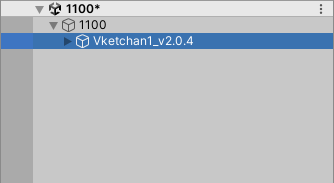
- Only the Root object of the exhibited avatar should be placed as a direct child of the empty object named with the Circle ID number.
- Object Tag must not be EditorOnly.
- Objects must use layers other than UserLayer28–31.
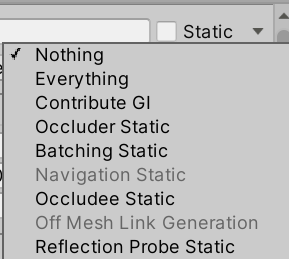
- All objects inside the "Static" object should have the Static settings defined below.
| Static setting | Regulation |
|---|
| Contribute GI | Disabled |
| Occluder Static | Disabled |
| Batching Static | Disabled |
| Occludee Static | Disabled |
| Reflection Probe Static | Disabled |
- Your exhibition must be contained within the boundary of 2m wide x 2m deep x 3m high
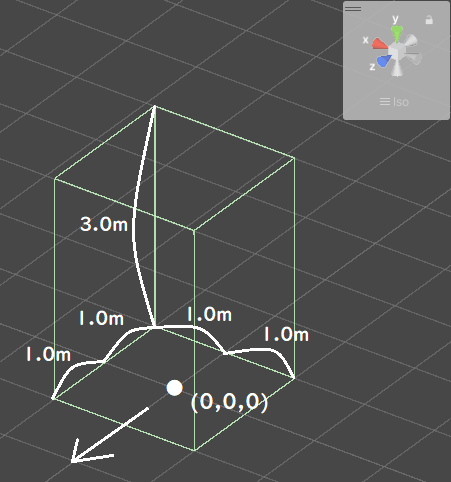
- ± 1m in the XZ direction and 3m in the Y direction with respect to the origin
- Z axis + direction (the direction of the blue arrow in Unity) is the front
- No limit on the number of textures
- However, atlasing (texture integration) is strongly recommended.
- One large size (4k) sheet is preferable to multiple small size (1k-2k) sheets.
- AssetBundle build size must meet the following size.
- This is the file size when building the space with only VRC_World in place
| Build Platform | Build Size |
|---|
| Windows | Under 5.00MB |
| Android | Under 3.00MB |
- SetPassCalls and Batches should be lower than the following values to reduce the drawing load.
- Run-time SetPassCalls reference value 12
- Run-time Batches estimated reference value 20
- Upon placement, the space may be rotated on the Y-axis.
- Upon placement, the coordinates will be different from the origin.
- Upon placement, the organizers will set poses and animations for the avatar.
- In Cross-Platform Venues, shader availability has restrictions in order to maintain Cross-Platform compatibility.
CrossPlatform Shader Allow/DenyList- Shaders listed on the AllowList are able to be used without restriction.
- Shaders listed on the DenyList cannot be used.
- Although shaders not listed on AllowList/DenyList can still be used, render appearance check on Mobile environments such as Quest is strongly advised.
- The shaders listed below will be distributed by the Vket staff along with VketTools.
- Manmaru Shader MnMrShader3_1_2
- Unity-chan Toon Shader 2.0.9
- UnlitWF Shader 2.10.0
- MToon v3.9
- UniUnlit in UniVRM-0.128.3_b045
- Filamented Standard 1.3
- When using UnlitWF Shader, please install their VPM packages in VCC and make sure the versions are matched.
- The above shaders do not need to be included in the submission folder.
- If you use the above shader with a different version or a modified script, be sure to use a duplicate and include it in the submission folder.
- When you want to include and use shaders other than those listed above, please follow the below restrictions.
- Global keywords like (shader_feature, multi_compile) cannot be used.
- Please use local keywords like (shader_feature_local, multi_compile_local) instead.
- Shaders with _CameraDepthTexture cannot be used to avoid issues of VR camera display.
- Scripts inside the Editor folder should not be put inside the submission folder.
- The name of the shader should not be identical to any of the built-in shaders of Unity.
- When using Stencil, keep the number of Stencil buffer to be not more than 200.
- VRC Phys Bone
- VRC Phys Bone Collider
- VRC Aim Constraint
- VRC Lookat Constraint
- VRC Parent Constraint
- VRC Position Constraint
- VRC Rotation Constraint
- VRC Scale Constraint
- Dynamic Bone
- Enable "Distant Disable" on use.
- Dynamic Bone Collider
- Mesh Filter
- Mesh Renderer
- Do not stick out of the Bounds space.
- Mesh Renderer with 0 materials is prohibited.
- Skinned Mesh Renderer
- Do not stick out of the Bounds space.
- Disable Update When Offscreen.
- Skinned Mesh Renderer with 0 materials is prohibited.
- Aim Constraint
- Look At Constraint
- Parent Constraint
- Position Constraint
- Rotation Constraint
- Scale Constraint
- Animator
- Not more than 5 per avatar
- Disable Apply Root Motion.
- Must be attached to the Root object of the avatar
All Components other than the above available Components
Please observe the following for avatars set in VRC_Avatar Pedestal, in accordance with VRChat's guideline.
Also, VRC_Avatar Pedestal components in Cross-Platform Worlds can only be valid when the set avatar is compatible in Cross-Platform environments.
The following installation / specifications will be implemented in the venue world:
- World installation
- World specifications
- Avatar Scaling
- Light settings
- Default, Player, PlayerLocal, Pickup, MirrorReflection, Realtime that illuminates the layer, DirectionalLight of NoShadow
- The angle of DirectionalLight depends on the world.
- Baked light with Shadow for world structures and booth exhibitions that illuminate the Environment layer
- LightProbes will be installed at 24 locations on the outer circumference of each space.
- A Reflection Probe for the world will be installed.
- Directional Mode is set to Non-Directional.
- Layer settings
- Default layer is used for objects that do not check ContributeGI (avatar model, etc.).
- The Pickup layer is used for objects that do not check ContributeGI (such as small models with pick up).
- The Environment layer is used for World structures and space exhibits that have ContributeGI checked.
- Water is used as a layer for Post Processing.
- Post Processing settings
- Use Bloom from Post Processing Stack V2.
- Navigation settings