Submission Rules: Avatar Exhibition
This page contains the submission rules for avatar exhibitions.
Please review this information when applying for an exhibition or submitting materials.
- For submission rules regarding space exhibitions, please refer to Submission Rules: Space Exhibition.
- For submission rules regarding item exhibitions, please refer to Submission Rules: Item Exhibition.
- The contents of this page may change or be updated due to rule revisions. Please review the information again before submitting your work.
- Please note that the rules and restrictions for Avatar Exhibition at Vket2025 Winter are significantly different from those of Vket2025 Summer.
- This Avatar Exhibition focuses on the Avatar Marketplace, aiming to provide visitors with the experience of changing avatars directly in-world.
- Exhibitors are required to submit a Unity Humanoid model.
- Non-Humanoid avatars or 3D models that are not avatars cannot be exhibited.
- products that are not Cross-Platform compatible cannot be exhibited.
- When applying for an avatar exhibition, you must select the method of distribution or sales for the avatar at the time of application.
- Those who have already registered their avatar in the Avatar Marketplace will receive top priority in the lottery.
- Please check the option "Sell on Avatar Marketplace" when applying for the lottery, and then enter your Listing ID.
- The entered Listing ID will only be used for the lottery. During submission, you can register a Listing ID again, specify a different product bundle, or exhibit a different avatar.
- Applicants with pending avatar registration requests in the Avatar Marketplace will likewise be given priority during the lottery.
- When applying for the lottery, you may complete your exhibition application after checking "Sell on Avatar Marketplace" even if the Listing ID field is left blank.
- However, please make sure to enter your Listing ID by 23:59:59 on September 29 JST.
- First-round winners must enter their Listing ID on time, otherwise their entry will move to the second lottery. Please note this in advance.
- If you do not plan to register your avatar on the Avatar Marketplace, please do not check "Sell on Avatar Marketplace" when applying for the lottery.
- If you expect that you will not be able to enter your Listing ID within the designated period, we recommend applying for the lottery without checking "Sell on Avatar Marketplace."
- Changed the process so that shaders requiring VPM package installation must be registered manually in VCC.
- Cross-Platform Venue
- YOUtopia
- VketPlaza -Quest Mode-
- Avatar Exhibitions will be open on the Cross-Platform Venue.
Submission Rules for Cross-Platform venues are similar as PC, but has the following differences:
- Exhibition must be available on Cross-Platform environments
- Maximum build size is 5MB for Windows build, 3MB for Android build
- Avatars registered to pedestal must be Cross-Platform compatible
- World Specification - Light Settings: Directional Mode is set to Non-Directional
- Shaders have restrictions for Cross-Platform compatibility
- A large number of spaces will be set up at each venue. We would like to have many gorgeous spaces lined up in a lively and fun venue.
- Meanwhile, to deal with the problems inherent to large-scale worlds, we will set rules for space creation.
- To maintain a comfortable playing environment for visitors by avoiding high load on the PC
- Avoid inconsistent formats that will cause difficulties for the organizers to check and manage the data
- Avoid fatal bugs such as instance crush resulting in VRChat crash or returning to other world
- Before submission, make sure to check the compliance with the submission rules. Please use the submission tool (hereinafter referred to as VketTools) provided by the organizer.
- Please note that if the submitted space does not comply with the submission rules, the organizers may request a resubmission.
- Even if the space complies with the submission rules, if the space is deemed problematic such as taking up a high load, the organizers may request a resubmission.
- In the case of spaces with a significantly small amount of information, the exhibitor may be asked to confirm after the submission period, and the space may be removed only if the confirmation cannot be obtained.
- Cross-Platform Venue Worlds will go through two separate builds for PC and Quest. Due to texture compression issues, the submitted space may look a bit different in PC build and Quest build.
- Checking appearance on real devices are strongly recommended.
- On Android build, some gimmicks may not function or have different behavior.
- The Cross-Platform Venue Worlds are expected to be visited by many players on mobile environments. Please avoid such a situation that your main exhibit is available only on PC-platform VRChat or on SteamVR.
- On the occasion of the world’s Android build capacity exceeding 100MB and uploading becomes unavailable, the development team may readjust the submitted data’s compression settings with the consent of the exhibitor.
- In the Avatar Exhibition (Cross-Platform Venue), one avatar and an information panel will be displayed per space.
- Submitted avatar will be placed in the Preview World once during the submission period and once after the submission period ends.
- Unlike other exhibition formats, the Preview World will not be updated daily.
- Avatar Information Board
- The external link button can only direct to product pages on the following services:
- Regardless of whether the avatar is sold on the Avatar Marketplace or on an e-commerce site, products that are not Cross-Platform compatible cannot be exhibited.
- If you wish to exhibit a product on the Avatar Marketplace, please note that you must be a VRChat-certified Avatar Marketplace seller, and the Listing ID of the avatar product is required when applying.
- For more information about the Avatar Marketplace, please refer to the following URL:
https://hello.vrchat.com/avatar-marketplace
- Submitted data will be exhibited as follows:
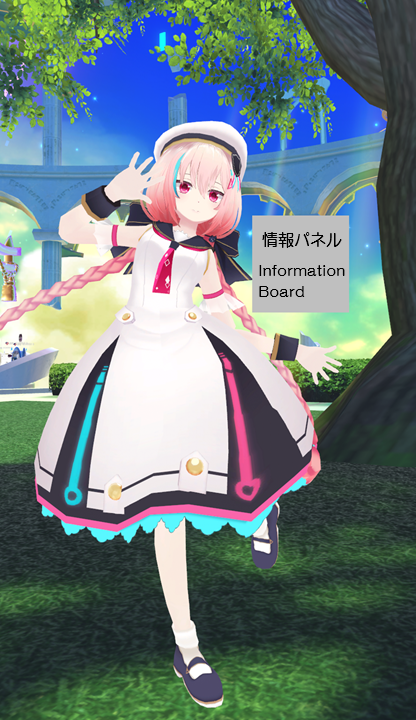
- Exhibited Avatar
- Animations corresponding to the world or location where the avatar is placed will be applied to the exhibited avatar.
- Please submit a Unity Humanoid model.
- Non-Humanoid avatars or 3D models that are not avatars cannot be exhibited.
- Avatar Information Board
- A board displaying product information and an avatar pedestal will be placed near the submitted avatar.
- Creator Name (JP/EN)
- Avatar Name (JP/EN)
- Price
- Depending on the sales method, the panel will have the following additional features:
- Avatar Marketplace
- A button to open the Avatar Marketplace product page corresponding to the registered Listing ID
- Other Services
- Avatar Pedestal (Cross-Platform support required)
- External link button to the product page on Other Services or the exhibitor's catalog page
- The settings for these features can be configured on VketTools.
Please note that work performed in environments other than the following will not be supported:
- Create space exhibition using Unity editor Ver2022.3.22f1.
- Create the exhibition Project using the VRChat Creator Companion (VCC).
- Project template must be selected to Unity2022WorldProject.
- Use the latest version of VRChat SDK at the time of submission.
- Please note that beta versions of the VRChat SDK are not supported.
- Use VketTools for submission.
- All assets used in the space should be placed under the Circle ID folder (e.g. 184) created directly under the Assets folder by VketTools.
- Create the space on the Circle ID scene found in the above folder.
- Only half-width alphanumeric characters,-(hyphen), _ (underscore), (half-width space), .(Dot), and () (parentheses) can be used for file & folder names.
- All files included in the Project should follow the above rule.
- If the file path contains a "User" folder, the project may not function correctly. Please create a new project in a location such as the root of the C: drive.
- All file paths should fit within 128 characters under "Assets /" in Unity.
- The mesh should be in such a format that can be used in Unity by default, such as ".fbx".
- ".blend" files cannot be read by default.
- Be sure to extract the Textures and Materials of the mesh.
- Total file size capacity under the submission folder must be within 100.00MB
- All objects included in the avatar should be arranged and set according to the following regulations.
- The Root object of the exhibited avatar must be placed as a direct child of an empty object named with the Circle ID number.
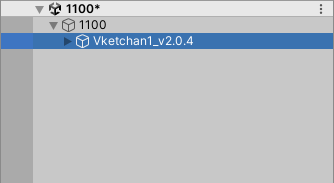
- Only the Root object of the exhibited avatar should be placed as a direct child of the empty object named with the Circle ID number.
- Object Tag must not be EditorOnly.
- Objects must use layers other than UserLayer28–31.
- All objects inside the "Static" object should have the Static settings defined below.
| Static setting | Regulation |
|---|
| Contribute GI | Disabled |
| Occluder Static | Disabled |
| Batching Static | Disabled |
| Occludee Static | Disabled |
| Reflection Probe Static | Disabled |
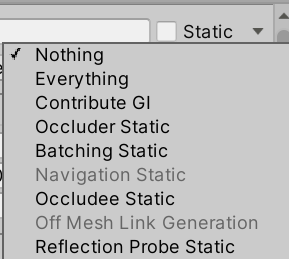
- Your exhibition must be contained within the boundary of 2m wide x 2m deep x 3m high
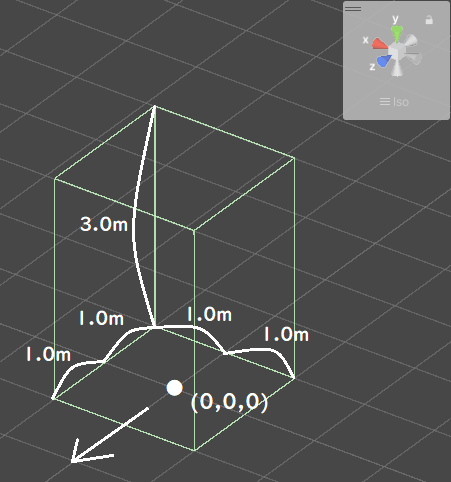
- ± 1m in the XZ direction and 3m in the Y direction with respect to the origin
- Z axis + direction (the direction of the blue arrow in Unity) is the front
- No limit on the number of textures
- However, atlasing (texture integration) is strongly recommended.
- One large size (4k) sheet is preferable to multiple small size (1k-2k) sheets.
- AssetBundle build size must meet the following size.
- This is the file size when building the space with only VRC_World in place
| Build Platform | Build Size |
|---|
| Windows | Under 5.00MB |
| Android | Under 3.00MB |
- SetPassCalls and Batches should be lower than the following values to reduce the drawing load.
- Run-time SetPassCalls reference value 12
- Run-time Batches estimated reference value 20
- Upon placement, the space may be rotated on the Y-axis.
- Upon placement, the coordinates will be different from the origin.
- Upon placement, the organizers will set poses and animations for the avatar.
- In Cross-Platform Venues, shader availability has restrictions in order to maintain Cross-Platform compatibility.
CrossPlatform Shader Allow/DenyList- Shaders listed on the AllowList are able to be used without restriction.
- Shaders listed on the DenyList cannot be used.
- Although shaders not listed on AllowList/DenyList can still be used, render appearance check on Mobile environments such as Quest is strongly advised.
- The shaders listed below will be distributed by the Vket staff along with VketTools.
- Manmaru Shader MnMrShader3_1_2
- Unity-chan Toon Shader 2.0.9
- UnlitWF Shader 2.10.0
- MToon v3.9
- UniUnlit in UniVRM-0.128.3_b045
- Filamented Standard 1.3
- When using UnlitWF Shader, please install their VPM packages in VCC and make sure the versions are matched.
- The above shaders do not need to be included in the submission folder.
- If you use the above shader with a different version or a modified script, be sure to use a duplicate and include it in the submission folder.
- When you want to include and use shaders other than those listed above, please follow the below restrictions.
- Global keywords like (shader_feature, multi_compile) cannot be used.
- Please use local keywords like (shader_feature_local, multi_compile_local) instead.
- Shaders with _CameraDepthTexture cannot be used to avoid issues of VR camera display.
- Scripts inside the Editor folder should not be put inside the submission folder.
- The name of the shader should not be identical to any of the built-in shaders of Unity.
- When using Stencil, keep the number of Stencil buffer to be not more than 200.
- VRC Phys Bone
- VRC Phys Bone Collider
- VRC Aim Constraint
- VRC Lookat Constraint
- VRC Parent Constraint
- VRC Position Constraint
- VRC Rotation Constraint
- VRC Scale Constraint
- Dynamic Bone
- Enable "Distant Disable" on use.
- Dynamic Bone Collider
- Mesh Filter
- Mesh Renderer
- Do not stick out of the Bounds space.
- Mesh Renderer with 0 materials is prohibited.
- Skinned Mesh Renderer
- Do not stick out of the Bounds space.
- Disable Update When Offscreen.
- Skinned Mesh Renderer with 0 materials is prohibited.
- Aim Constraint
- Look At Constraint
- Parent Constraint
- Position Constraint
- Rotation Constraint
- Scale Constraint
- Animator
- Not more than 5 per avatar
- Disable Apply Root Motion.
- Must be attached to the Root object of the avatar
All Components other than the above available Components
Please observe the following for avatars set in VRC_Avatar Pedestal, in accordance with VRChat's guideline.
Also, VRC_Avatar Pedestal components in Cross-Platform Worlds can only be valid when the set avatar is compatible in Cross-Platform environments.
The following installation / specifications will be implemented in the venue world:
- World installation
- World specifications
- Avatar Scaling
- Light settings
- Default, Player, PlayerLocal, Pickup, MirrorReflection, Realtime that illuminates the layer, DirectionalLight of NoShadow
- The angle of DirectionalLight depends on the world.
- Baked light with Shadow for world structures and booth exhibitions that illuminate the Environment layer
- LightProbes will be installed at 24 locations on the outer circumference of each space.
- A Reflection Probe for the world will be installed.
- Directional Mode is set to Non-Directional.
- Layer settings
- Default layer is used for objects that do not check ContributeGI (avatar model, etc.).
- The Pickup layer is used for objects that do not check ContributeGI (such as small models with pick up).
- The Environment layer is used for World structures and space exhibits that have ContributeGI checked.
- Water is used as a layer for Post Processing.
- Post Processing settings
- Use Bloom from Post Processing Stack V2.
- Navigation settings