TOP › My Page TOP ›
Submission Workflow › Technical Guides / Submission Tips ›
Render Cost Reduction (SetPassCalls/Batches)
Render Cost Reduction (SetPassCalls/Batches)
Under our submission regulations, there are limitations on the number of SetPassCalls and Batches per space. In this page, we will introduce you what these values mean and how to cut the render cost on Unity.
Space Exhibition
- Number of SetPassCalls on Play: 20
- Number of Batches on Play: 30
Item Exhibition
- Number of SetPassCalls on Play: 6
- Number of Batches on Play: 10
Note that these limitations can vary based on other circumstances, such as the World that your space is going to be placed and formats of exhibition.
Please check the regulations applicable beforehand.
SetPassCalls/Batches shows the estimated render cost of the Project. It can be checked from "Stats" located at the upper-right of the Game View on Unity.
The numbers below are the Statistics for one random VRChat avatar, meaning that its render cost is equivalent to a couple of spaces.
When submitting your space, the VketTools measures the render cost of each space. The values shown on the Game View should be used only for referential purpose. (Objects not to be submitted may be counted in)
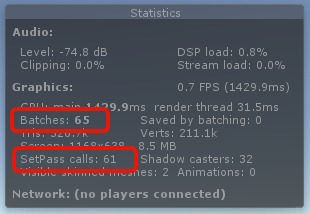
- Batches
- The number of GPU calls CPU made per frame for Mesh rendering
- SetPassCalls
- The number of GPU calls CPU made per frame for Material rendering.
On rendering, Unity first designates the Mesh by Batches, Material by SetPassCalls, and then renders by DrawCall. The bigger those numbers are, the more Unity renders in a frame, which means a higher render cost.
The ultimate method for reducing SetPassCalls and Batches is to reduce the number of Meshes and Materials. Luckily, there are several ways we can reduce render costs by utilizing functionalities of Unity itself or using other tools.
Your cooperation allows more spaces to fit in the World, so please cooperate on mitigating the render cost!
- Set Batching Static.
- Combine several Materials into one.
- Combine several Meshes into one.
- Change the shader to a less demanding one.
Taking a standard space configuration, a space with an avatar in the center and structures around as an example, the simplest reduction method would be like this:
- As a general plan, making the surrounding structures as light as possible and putting more render resources into the main exhibit - the avatar, in this case - is effective.
- To do that, combine the structures' Mesh into one
- Combine the structures' Materials into either of the two: Opaque or Transparent.
- Also, the Mesh of the avatar shall also be combined.
- One Mesh and two materials would be awesome
- As long as it's not exceeding the regulations, it is all up to you to decide where to focus the limited rendering resource on.
- Set Batching Static to immobile objects.
- For immobile objects, setting Batching Static can work really well. Unity will create a "Batch" combined with surrounding Objects, resulting in a reduction of the number of Batches.
- Note: Some shaders might not work with Batching Static.
- The Transform of the Mesh is going to be lost by Batching, and especially losing Rotation and Scale can cause issues with some shaders.
- Shaders using vertices such as the Toon shader with outlines and the Fur shader tend to have issues with this.
- We strongly recommend that you confirm your space appearance in VRChat, since we have received many reports that rendering in VRChat was broken even though it displayed correctly in the Unity Editor.
- If DisableBatching is enabled on the Shaders, Batching may not contribute to the reduction of Batches.
Batching only works between Meshes using the same Material. If different materials are used, Batching may not contribute to the reduction.
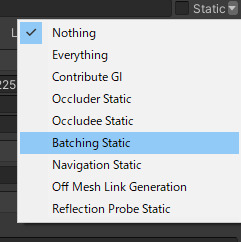
Batching Static is located here in the Static settings menu.
Rendering with a single Material can reduce the number of SetPassCalls.
Meshes with the same Material will be Batched, which might reduce Batches too. To combine several Materials into one, the following three conditions must be met.
- Materials should use the same shader.
- Materials should be set with the same values.
- Texture Atlas should be applied.
You can set up Texture Atlas with either of the following options.
- Use a 3D modelling software, such as Blender.
- Use tools enabling Texture Atlas in Unity.
Combining Meshes can be helpful in reducing Batches. You can use either of the below methods.
- Use a 3D modelling software, such as Blender.
- Use tools for combining Meshes in Unity.
Shaders that call render more than once (multipass shaders) will call SetPassCall several times too, and so changing it can contribute to saving render cost.
For example, if you are using a toon shader with outlines, using no-outline version is worth considering. In general, toon shaders use a different pass for the outline separate from the main shading. Thus, there is a high possibility that a shader without outlines can contribute to reducing render costs. Changing the outline width to zero will not disable the outlining process, so you should use the version without the outline, which usually comes with toon shaders. It is also possible to decide not to use outlines for models that had outlines originally so as to save render cost.
- MMS3
- "Mnmrshader3" is the no-outline version, and "Mnmrshader3_Outline" is the version with outlines.
- Reflex Shader2
- No-outline version is available under No Outline.
- UnlitWF
- Shaders with outlines are named _Outline.
- UTS
- No-outline version is available under NoOutline.
Check the Official Guidelines
Before submitting, please make sure to review the Exhibition Guidelines and Submission Rules. For the submission steps, see the Submission Guide.
↑ Back to Top