Javascript is required

TOP › My Page TOP ›
Submission Workflow

Submission Workflow

🗺️
Vket 2026 Winter

Your index for all Vket exhibition and submission documents.
Come back to this page whenever you are not sure what to read next.

📋1Find by exhibition formatCheck that you have every document your format needs🕒2Find by stageWhat to read at each stage, from application to revisions📚3Pages you can use any timeTechnical guides, official assets and FAQs that never change

Find by exhibition format

Read down the card for your exhibition format to see all the documents you need.

Space ExhibitionCross-Platform Venue
PCVR (Quest/PC VR)Mobile
Unity

📄 Documents shared by every exhibition format

Find by stage

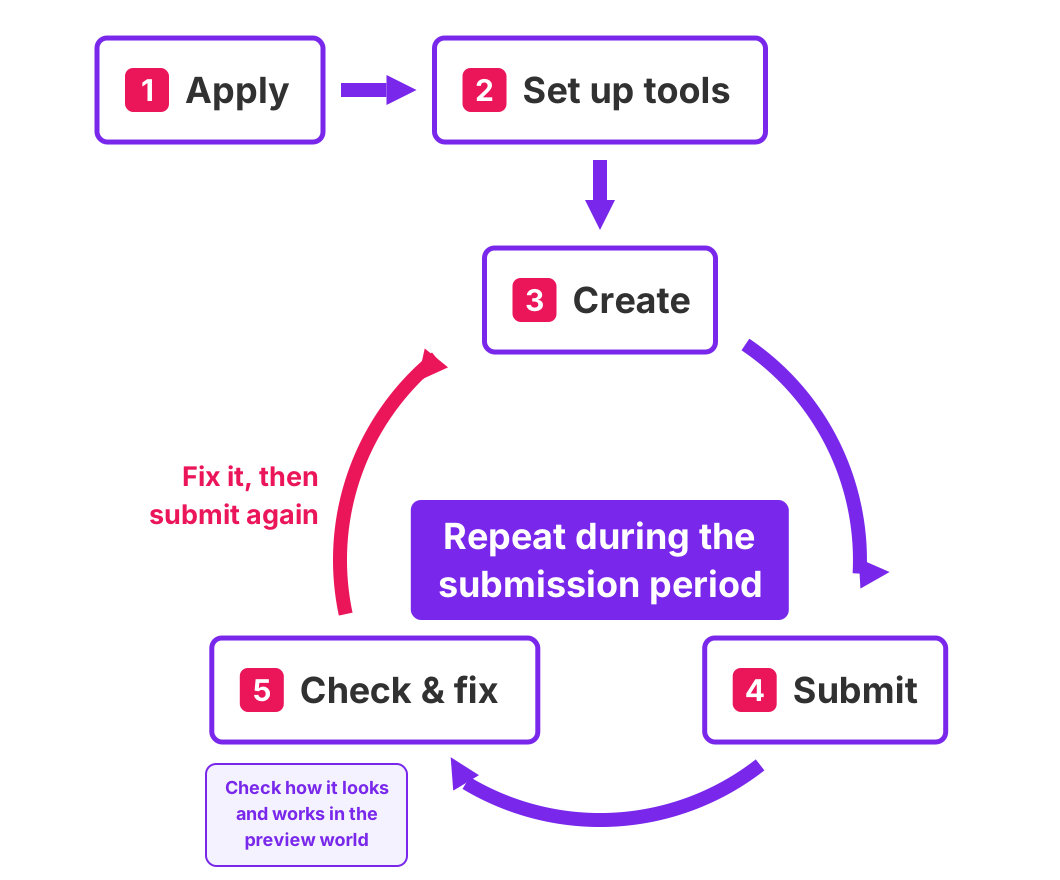
Here is the whole flow, from applying through submitting to handling revisions, with the documents you need at each stage.

From application to submission and revisions

1 Apply → 2 Set up tools → 3 Create → 4 Submit → 5 Check & fix. Steps 3 to 5 repeat during the submission period: fix your work, then submit it again.

You can submit as many times as you like while the submission period is open.
Submitting is not the end: check how your work looks in the regularly updated preview world, fix what needs fixing, and submit again.

▼ Click a stage to see the documents you need at that point.

1📝ApplicationChoose your format, check fees and dates
2🛠️Tool setupGet your environment ready
3🎨CreatingBuild your exhibit
4📤SubmittingUpload your exhibit
5👀Check & fixCheck in the preview world, fix, and submit again

Pages you can use any time

These pages are not updated per event.

↑ Back to Top